NetRef: The Classroom Tool That Helps Teachers Manage Online Learning
From blocking distracting websites to tracking digital learning activity, here is how this education software works, what it offers schools, and what changed after its acquisition.

Last Updated on October 25, 2026 by Business Blog Media Editorial Team
Students use the internet every day. They research topics, complete assignments, and watch lessons. But distractions are everywhere.
One click changes everything.
A student might open a game. Another starts browsing social media. Suddenly, the teacher loses their attention.
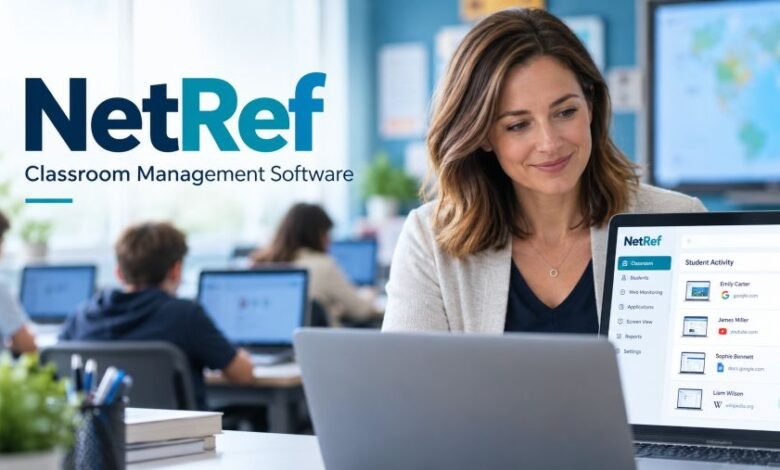
NetRef is classroom management software that helps teachers control student internet access, monitor online activity, and keep digital lessons focused. It also gives school administrators information about technology use.
The platform started in the United States. It later became part of Linewize, a school technology business within Qoria.
But how does it work? And is the original software still available in 2026?
Here is what the verified information shows.
Quick Facts
| Detail | Information |
|---|---|
| Name | NetRef |
| Business type | Educational technology |
| Founded | 2014 |
| Co-founder | George Dotterer |
| Origin | Dulles, Virginia, USA |
| Original developer | Verite Educational Systems |
| Main users | K–12 schools and teachers |
| Main purpose | Classroom internet management |
| Key features | Website controls, activity monitoring, reporting |
| Acquisition year | 2021 |
| Acquired by | Family Zone |
| Associated education brand | Linewize |
| Parent-group brand | Qoria |
| Original website | net-ref.com |
| Related current website | linewize.com |
| Pricing | Institutional licensing; current quotes require confirmation |
What Is This Classroom Management Software?
Think about a typical classroom.
Students have laptops or Chromebooks. Their teacher wants them researching history. But some students start visiting unrelated websites.
Managing every screen takes time.
This is where the software helps.
Teachers can set internet access rules for their lessons. They can restrict unwanted websites. They can also check online activity through a classroom dashboard.
The idea is simple.
Keep useful websites available. Reduce unnecessary distractions. Give teachers better control.
School administrators have different needs. They want to know which educational applications students use and whether paid software subscriptions are being used.
The platform includes reporting features for that purpose.
It was built mainly for schools. It is not a general internet browser or a social networking service.
How Does the Platform Work?
The software works through a school-managed setup.
Teachers access classroom controls after the school configures the system. Student groups and access permissions depend on the institution’s setup.
Once everything is ready, teachers can manage internet activity during lessons.
For example, imagine a science class.
The teacher wants everyone using an online science resource. A few students open entertainment websites instead.
The teacher can restrict unwanted access and direct students toward their assigned work.
No need to interrupt everyone.
That is the main benefit.
Historical product materials also describe browser-tab controls and visibility into student activity. Some functions depend on the device, software version, and school configuration.
Main Features and Tools
1. Website Blocking
Teachers can block distracting websites during lessons.
This may include games, entertainment pages, or websites unrelated to an assignment.
Access rules can also vary by classroom.
The teacher decides what students need for a particular activity, within the school’s wider internet policy.
2. Real-Time Activity Monitoring
Teachers need to know what’s happening.
The software offers activity monitoring so staff can check how students are using the internet.
Its documented features include website activity tracking and screen monitoring.
This helps teachers spot distractions sooner.
3. Individual Internet Controls
Every classroom is different.
Some students need access to websites that others do not.
The platform allows teachers to create individual internet policies rather than applying identical restrictions to everyone.
That gives schools more choices.
4. Classroom Screen Visibility
Teachers can review student screen activity in supported environments.
This makes it easier to identify unrelated browsing during a lesson.
Historical product documentation also describes live tab visibility.
Exact controls depend on deployment settings.
5. Learning Reports
School administrators need reliable information.
The software collects usage data that can help them understand which online resources students access.
These reports may support decisions about technology budgets and educational subscriptions.
For example, a school might discover that an expensive learning application receives very little use.
That information matters before renewal.
6. Online Assessment Support
Online tests require student attention.
A restricted browsing environment can help reduce access to unrelated websites during assessments.
The platform has documented website restrictions and assessment-management capabilities.
Schools must still check whether the available settings meet their own testing requirements.
7. Remote Classroom Management
Online learning happens outside schools too.
Historical product materials describe support for monitoring student activity during remote instruction.
This can help teachers supervise assigned learning activities when students are away from the classroom.
Remote access and monitoring depend on school policies and supported configurations.
The Story Behind the Company
The business began in 2014.
George Dotterer, a technology entrepreneur, was involved in its creation through Verite Educational Systems.
Verite had experience building technical solutions for government and business clients.
The education project had a different goal.
Schools were introducing more connected devices. Teachers needed practical ways to manage student internet use without asking IT teams to handle every classroom restriction.
Early development involved working with educators and testing the idea in a school environment.
The product grew from that work.
By 2018, it had attracted national coverage, including a Forbes article discussing online distractions and classroom technology management.
The company also placed growing attention on learning analytics and software usage reporting.
What Happened in 2021?
A major business change arrived in 2021.
Family Zone Cyber Safety acquired the educational software business from Verite Educational Services.
The acquisition brought the product into the Linewize operation.
Family Zone already worked in school internet filtering and online safety.
The acquisition added classroom management technology and associated expertise.
The wider group kept expanding.
In 2023, Family Zone introduced the Qoria corporate identity.
According to Qoria’s official company history, the NetRef acquisition took place in 2021.
This history is important because older software listings still use the original product name.
Is the Software Still Available in 2026?
This question needs a careful answer.
The original name still appears in software listings, including Capterra and Microsoft Marketplace.
Linewize also continues selling classroom management products.
Its current website prominently promotes Linewize Classroom Manager alongside filtering, student safety, and EdTech reporting tools.
However, those listings do not fully establish whether every original package is still offered to new customers under its old name.
So schools should check directly.
The safest option is to contact Linewize and ask which current product matches their requirements.
Pricing and Subscription Information
Schools naturally want to know the price.
But there is no single verified public price that applies to every institution.
Capterra’s June 2026 listing displays a starting price of $0.01 per user per month and mentions trial availability.
That figure needs context.
It should not be treated as a confirmed final contract price for a school.
Real purchasing terms may depend on the number of student licences, subscription duration, selected services, and institutional requirements.
Before buying, ask for a written quotation.
Also check whether training, support, and implementation are included.
Benefits for Teachers and Schools
Less Classroom Distraction
Students often switch between websites.
That can interrupt learning.
Internet restrictions help teachers keep attention on assigned work without constantly checking every laptop.
More Control for Teachers
Teachers may otherwise rely on IT staff.
Classroom controls can reduce that dependence for everyday internet restrictions.
This gives teachers more direct control during lessons.
Better Technology Spending Decisions
Schools purchase many online tools.
Some become popular. Others remain unused.
Usage reports can help administrators review adoption and decide which subscriptions deserve further investment.
Support for Different Learning Settings
Some lessons happen in classrooms. Others happen remotely.
The software has documented capabilities for both settings, although schools must check the exact support available for their devices.
Limitations Schools Should Consider
No classroom monitoring system solves every problem.
Students still need good teaching. Schools still need clear rules.
Technology alone cannot guarantee attention.
Privacy is another serious concern.
Monitoring tools may handle student browsing information and screen activity. Schools should decide who can see that information and how long it should be kept.
Access must follow applicable privacy laws and school policies.
Device compatibility matters too.
A school should test the system before committing to a large rollout.
Staff training also takes time. Teachers need to understand what the software can and cannot control.
These are practical checks, not evidence that the product is unsafe.
What Do Customer Reviews Say?
Independent feedback is limited.
Capterra’s June 2026 listing shows zero user reviews for the original product.
Its displayed 0.0 rating reflects the absence of ratings, not a proven poor customer experience.
So it would be misleading to describe the software as highly rated or badly rated.
Schools should seek current demonstrations, independent references, and hands-on testing before purchasing.
Other Classroom Management Software
Several other products serve similar needs.
| Software | Main Use |
|---|---|
| GoGuardian Teacher | Browser monitoring and classroom website controls |
| Hāpara Highlights | Student browsing visibility and guided online learning |
| NetSupport School | Classroom screen monitoring and device control |
| Linewize Classroom Manager | Student online activity management and classroom controls |
These tools are not identical.
Some focus on browser restrictions. Others offer wider classroom teaching features.
The right choice depends on school devices, privacy requirements, pricing, and the controls teachers actually need.
Who Should Consider This Type of Software?
The product was built for the education sector.
Its main audience includes schools that use student laptops, Chromebooks, and other connected learning devices.
Teachers may benefit from lesson-level website controls.
IT administrators may value central oversight.
School leaders may use reporting data to review spending on educational applications.
Small schools and large districts have different needs, so purchasing decisions should start with a clear list of requirements.
Important Difference Between Similar Names
There are unrelated businesses using the same name.
For example, netref.co is a business networking and referral platform.
Netref.eu is a digital marketing and SEO agency.
These services should not be confused with the American educational technology business.
They have different purposes and business histories.
A website address is the easiest way to tell them apart.
Final Thought
NetRef started with a practical classroom problem.
Students needed internet access. Teachers needed a way to manage it.
The product gave educators more control over browsing while offering schools information about their digital resources.
Its 2021 acquisition changed the business behind it.
Today, the Linewize and Qoria connection is an important part of understanding its history.
For schools considering a purchase, the sensible next move is simple: check the current offering, request a demonstration, review privacy safeguards, and confirm the full licensing cost.
Good technology should support good teaching.
That remains the point.
Frequently Asked Questions
What is the main purpose of this software?
It helps teachers manage student internet access during lessons. Schools can also review online activity and educational software usage.
Who founded the company?
George Dotterer co-founded the business in 2014 through the Verite technology operation in Virginia, United States.
Is it free to use?
A software directory lists trial availability, but a universally free school plan is not confirmed. Schools should request current licensing information.
Can teachers block websites?
Yes. Website blocking and classroom-specific internet access controls are documented features.
Does it support Chromebooks?
Chromebooks are among the device types mentioned in the product’s historical software listings. Schools should confirm current compatibility before deployment.
Who owns the educational product?
Family Zone acquired the business in 2021. It became part of the Linewize operation within the group later branded Qoria.
Can schools monitor students remotely?
Historical materials describe remote classroom activity monitoring. Actual access depends on the school’s installation, device support, and permissions.
Is this an SEO service?
No. The educational product is unrelated to the Netref.eu digital marketing agency, which offers SEO and website services.