Last Updated on October 16, 2026 by Business Blog Media Editorial Team
A reliable charging setup is no longer just about carrying a cable and hoping to find an available socket. For people who work remotely, travel frequently, attend meetings, or spend long hours away from home, keeping essential devices powered requires a little more planning. Smartphones handle work messages, navigation, banking, photography, and authentication codes, while wireless earbuds and other accessories support communication throughout the day. When several devices need power at different times, a well-planned charging kit can make everyday routines considerably easier.
The challenge is choosing accessories that complement one another instead of carrying unnecessary equipment. A portable battery can provide backup power during a long commute, while a magnetic wireless charger can make charging a compatible iPhone more convenient at a desk or bedside table. Understanding the difference between these solutions helps users build a setup around their actual habits rather than purchasing accessories based only on their appearance or advertised specifications.
The most practical approach is to consider where charging problems usually occur. Someone working from cafés may need portable power and a compact cable, whereas a frequent traveller might prioritise battery capacity, charging speed, and the ability to power several devices. For everyday users, combining a suitable power bank with the right charging accessories can provide a more flexible solution for both planned activities and unexpected delays.
Understanding Your Daily Charging Requirements
Before choosing charging accessories, consider how you use your devices throughout a typical day. A person who mainly checks messages and makes occasional calls will have different requirements from someone who records videos, uses navigation for several hours, or attends back-to-back video meetings. Screen brightness, mobile data, demanding applications, and weak network signals can all influence how quickly a smartphone battery runs down.
Start by identifying the devices that matter most. For many people, a smartphone is essential, but a tablet, wireless earbuds, smartwatch, or portable gaming device may also require regular charging. Listing these devices makes it easier to determine which accessories deserve space in a daily bag.
Next, think about when access to electricity becomes inconvenient. A university student may need extra power between classes, while a remote worker might spend the afternoon moving between meetings and shared workspaces. Travellers often face a different problem: even when charging outlets are available, they may be occupied or located far from a comfortable seat.
These details help determine whether portability, capacity, wireless convenience, or multiple charging connections should be the main priority.
Why Portable Batteries Are Useful Beyond Travel
Portable batteries are commonly associated with holidays, airport waiting areas, and long road trips, but they can be equally useful during ordinary working days. A depleted smartphone can interrupt navigation, prevent access to important messages, or make it difficult to complete a payment. Keeping backup power available reduces dependence on finding a wall outlet at the right moment.
Capacity is one of the first specifications to compare. Smaller batteries are generally easier to carry and can be suitable for occasional top-ups. Higher-capacity models may provide more charging opportunities or support additional devices, although they tend to occupy more space and weigh more. The amount of usable energy also differs from the advertised capacity because charging involves conversion losses and other factors.
Charging output matters just as much. A battery with a high capacity may still charge a particular phone slowly if its output does not match the phone’s supported charging standard. Users should therefore compare supported wattage, USB-C compatibility, available ports, and cable requirements instead of choosing a model based on capacity alone.
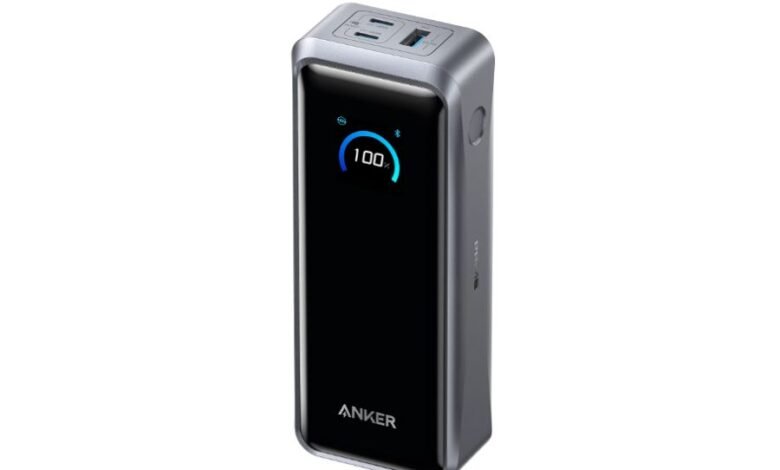
Built-in cables can reduce the number of accessories carried in a bag. Other designs include displays that show remaining battery levels, making it easier to estimate when the portable battery itself needs recharging. The best combination depends on whether the priority is simplicity, charging speed, or flexibility across several devices.
Where Magnetic Wireless Charging Fits Into the Setup
Portable batteries solve the problem of having limited access to electricity, but they are not the only useful charging accessory. Magnetic wireless charging can make everyday charging more convenient when a compatible phone supports the required technology.
An apple magsafe charger can be particularly useful for people who regularly charge their iPhones at a desk, beside their bed, or in a designated workspace. Magnetic alignment helps position a compatible device correctly on the charger, reducing the small adjustments sometimes required with conventional wireless charging pads. Depending on the charger and phone, users may also benefit from a tidy setup that avoids repeatedly plugging and unplugging a cable.
Compatibility deserves attention before purchasing. MagSafe functionality and charging speeds vary according to the iPhone model, charger, power adapter, and other requirements. Some accessories use magnetic attachment without providing the same charging capabilities as Apple’s MagSafe technology. Checking the product specifications and supported standards helps prevent confusion.
It is also important to distinguish between a magnetic charging pad and a magnetic battery pack. A charging pad normally needs an external power source, while a magnetic battery pack contains its own battery and can supply power away from a wall outlet. Although these products may look similar, they serve different purposes in a charging routine.
Creating a Compact Charging Kit for Remote Work
A useful charging kit should be organised around real needs rather than packed with every accessory that might occasionally prove useful. For someone working from different locations, a compact pouch can keep essential equipment together and prevent cables from becoming tangled inside a backpack.
A practical setup may include a portable battery, one reliable USB-C cable, a compatible wall adapter, and the cable or adapter required for any additional device. People who use magnetic wireless charging at a regular desk can keep that accessory at their workspace instead of carrying it everywhere.
Cable selection is particularly important when multiple devices are involved. USB-C connectors do not automatically guarantee identical charging performance, and some cables support higher power levels than others. Checking the cable’s power rating and the requirements of the connected equipment can help users avoid unnecessary charging delays.
Organisation also makes it easier to notice when something is missing. Keeping the same accessories in a dedicated pouch creates a repeatable routine: recharge the portable battery, return the cables to the pouch, and check the kit before leaving home. This simple habit can be more useful than purchasing additional equipment that rarely gets used.
Choosing Charging Accessories for Different Environments
Different environments place different demands on charging equipment. A charging setup designed for a home office may not be ideal for an outdoor excursion, and accessories that work well during a short commute may be insufficient for an international trip.
At home, convenience and organisation are often the priorities. A dedicated charging location reduces clutter and gives frequently used devices a predictable place to recharge. A magnetic wireless charger can suit a bedside table or desk, while a wall adapter with appropriate output can serve devices that require wired charging.
At a shared workspace, portability becomes more important. A compact battery allows users to move between tables without interrupting essential tasks, and a short cable can make the setup easier to manage in a crowded environment. It is worth considering whether the workspace provides reliable access to electrical outlets before deciding how much backup power to carry.
For travel, users should evaluate capacity, charging speed, weight, and airline requirements. Many airlines restrict spare lithium batteries to carry-on baggage and impose specific capacity limits or approval requirements. Travellers should check their airline’s current rules before departure rather than assuming every battery can be packed in checked luggage.
Outdoor activities require additional consideration. Dust, moisture, heat, and accidental impacts may affect equipment reliability. Keeping electronics protected in a suitable pouch and avoiding exposure to excessive temperatures can help preserve the accessories over time.
Battery Health and Safe Charging Practices
Convenience should never come at the expense of safe charging habits. Both phones and charging accessories benefit from being used according to their manufacturers’ instructions. Users should avoid damaged cables, swollen batteries, and accessories that become unusually hot during normal operation.
Heat is especially relevant when charging devices in direct sunlight or inside a parked vehicle. High temperatures can affect battery performance and long-term health, so electronics should be kept in a cool, dry location whenever practical. Charging accessories should also be placed on stable surfaces with adequate ventilation rather than covered by bedding or other materials that trap heat.
Portable batteries need regular attention as well. Recharging a battery before an important journey reduces the risk of discovering that it is empty when needed. Users should inspect connectors for damage, store equipment properly, and discontinue use if a battery shows signs of physical swelling or other unusual behaviour.
For wireless charging, proper alignment and a compatible power source can improve reliability. Thick cases, metallic objects, or incompatible accessories may interfere with charging or cause excess heat. Following the charger manufacturer’s guidance helps users identify the correct setup for their devices.
Getting Better Value From Your Charging Accessories
Buying the most expensive accessory does not automatically produce the best charging experience. Value depends on how well a product fits the devices and situations in which it will be used.
A person who rarely leaves home may gain more from a reliable desk charger than from a high-capacity portable battery. Someone who travels frequently may benefit from a compact battery with sufficient output for their phone and other essential devices. Users with compatible iPhones may appreciate magnetic charging for its convenience, while those with several different devices may prefer a combination of wired and wireless options.
It is also useful to consider the accessories already available. An existing USB-C adapter may work with a new charging cable, provided the adapter supports the required power and charging standard. Avoiding unnecessary duplicates can keep costs down while still improving the overall setup.
Finally, compare warranty coverage, product specifications, safety features, and compatibility information before purchasing. Reliable charging equipment should make daily life easier for a long time, not simply offer an impressive feature list on the packaging.
Final Thoughts
A smarter charging setup begins with understanding where and how devices are used throughout the day. Portable batteries provide valuable backup power when outlets are unavailable, while magnetic wireless charging can make regular charging more convenient for compatible phones. Together, these solutions can support a more flexible routine for remote workers, commuters, students, and frequent travellers.
The key is to choose accessories that serve distinct purposes. Match battery capacity and output to your devices, verify compatibility before buying a magnetic charger, and keep essential cables organised in a dedicated pouch. With a little planning, charging becomes a predictable part of the day rather than an unexpected problem that interrupts work or travel.
Frequently Asked Questions
What should I consider when choosing a power bank?
Compare battery capacity, charging output, weight, available ports, cable compatibility, and the devices you intend to charge. A compact model may suit everyday phone use, while a higher-capacity option can be more useful for longer trips or multiple devices.
Is a magnetic wireless charger the same as a magnetic power bank?
No. A magnetic wireless charger generally receives power from an external source, while a magnetic power bank stores energy in its own battery. Both may attach magnetically to compatible phones, but their intended uses are different.
Can I use a MagSafe charger with every iPhone?
Compatibility and charging performance depend on the iPhone model, charger design, and supported standards. Check the manufacturer’s specifications to confirm whether your device supports the intended magnetic attachment and charging features.
Can one portable battery charge multiple devices?
Some models support several devices through multiple ports, while others are designed primarily for a single device. The total available output may be shared between connected devices, so check the specifications if you intend to charge several items simultaneously.
How can I keep my charging kit organised while travelling?
Use a dedicated pouch for the portable battery, cables, and adapters. Recharge the battery before departure, inspect cables for damage, and confirm airline requirements for carrying spare lithium batteries.
What is the best way to maintain charging accessories?
Use compatible adapters and undamaged cables, avoid excessive heat and moisture, and follow the manufacturer’s storage and charging instructions. Replace accessories that show signs of damage or abnormal operation.